
When creating our self-study courses, we tried out various formats to present our content in a visually appealing and interactive way.
In the past (yes, still during the coronavirus lockdown), often “classic” Office formats were used for e-learning. However, text documents or presentation slides that are offered for download as PDF documents (for scripts, presentations, or worksheets) usually lack “interactive” elements, such as an integrated quiz.
But with H5P, creating interactive teaching materials is child’s play.
H5P is an HTML-based tool that can be used to create various types of quizzes (multiple choice, fill-in-the-blank, flashcards) easily and without any programming knowledge. It’s quick, easy, and reliable. The finished H5P files can be integrated into learning platforms (Moodle has integrated H5P since 2020 and version 3.9) or directly into your own website (e.g., WordPress, Drupal).
Of course, our Moodle system also allows us to create quiz questions using its built-in tools, as it was developed for e-learning. But H5P are easier to create, look nicer, and can be combined with each other. In addition, they are mostly accessible, there is good documentation, and numerous online tutorials.
Above all, H5P goes far beyond small quizzes. Page layout elements (column, page) can be integrated into an interactive book, for example.
And unlike a Moodle Book, H5P Books (or Course Presentations, Game Maps, Portfolios, and other more complex formats) can easily be used outside of Moodle.
This allows us to bundle content and activities for a course or course module into a permanent unit of learning, share it from edu-sharing with our Moodle (and the world), and reuse it in all kinds of systems and contexts.
In other words, by taking a detour via H5P, we can make our Moodle FAIR.
For creating more complex activities, H5P allows you to embed other H5P types. This means you can ask questions or quiz definitions after an “infodump,” or combine prepared questions into a final test.
If you want to add a multiple-choice question to a course presentation, for example, you can copy and paste this question from an existing quiz using the clipboard. It’s not elegant, but it works.
The use and creation of H5P is free of charge (online editors often require registration and/or charge for storage space). However, the Lumi Desktop Editor can also be installed locally. Our Moodle LMS and our repository (edu-sharing) also have an integrated H5P editor, which can be used to create materials directly in the respective system environment and integrate them from there. This is practical because our repository takes care of versioning and metadata!
However, there are also drawbacks:
Neither Moodle nor edu-sharing allow simple saving during creation. If you want to save, the editor closes and you have to reopen the file with several clicks – this is tedious and time-consuming, especially with larger and more complex H5P elements.
Lumi allows you to save your work with CTRL+S.
And yes: frequent and regular saving is a good idea, because sometimes saving can go wrong…
That’s why I create the planned quiz questions in separate text documents. If you format them correctly right away—e.g., enclosing the answers for fill-in-the-blank texts in “*”—you can simply copy and paste the texts.
I also “sketch” my ideas for the layout and illustrations of course sections locally in PowerPoint – text and images on the slide, alt text and image sources in the notes function. What sounds like double work has unfortunately saved me many times.
The following workflow has proven successful for me: the file containing the draft text for the respective learning objective also includes one or more quiz questions that can be answered using this text. This allowed me to give the tests to my colleagues for peer review along with the texts.
The quiz questions (multiple choice, fill-in-the-blank, true/false questions, etc.) were given the learning objective ID and the quiz type as their title, so they can be precisely assigned to a text in any context. (And linked in Obsidian!)
All of this works, but unfortunately only within certain limits.H5P was developed as an interactive supplement to static content—the larger the file and the more complex the format, the more unstable it apparently becomes.
An H5P Interactive Book would be the natural solution for our courses because it could evaluate all of the integrated quizzes at the end on a single page. However, the layout options are very limited—a two-column layout with images on the left and text on the right is not possible. Unfortunately, this did not fit in with our plans to convey content in dialogue with our personas.
H5P Course Presentations are quite intuitive to use (with a little presentation experience) and allow for precise layout – but in practice, they often “swallow” colors or images – they suddenly disappear after saving.
I use different text colors for each persona and lots of illustrations for clarity. I can’t count how many times I’ve had to reinsert all the image files just because I had to correct a typo.
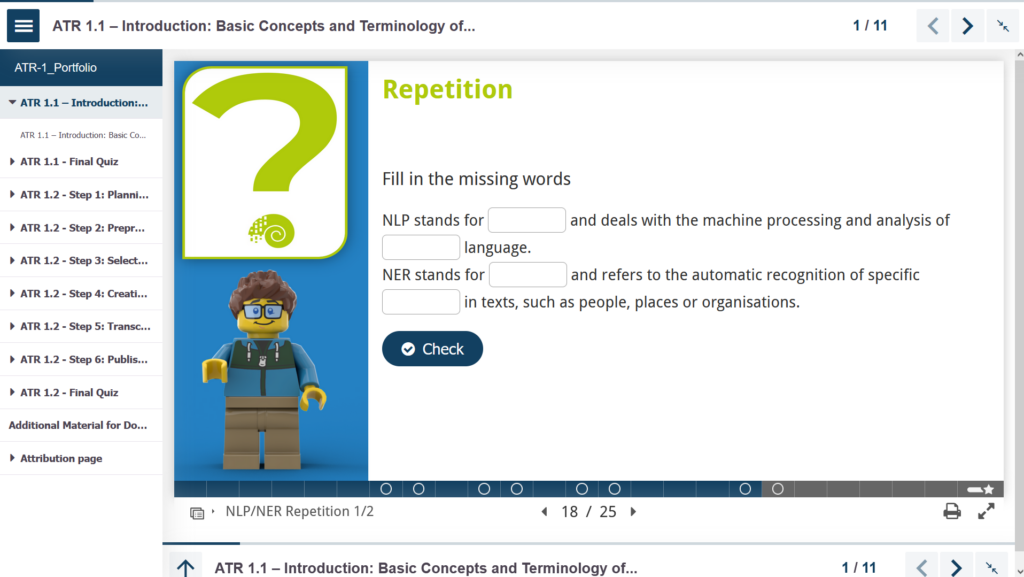
We ultimately decided on H5P Portfolios: these allow for a more flexible layout using placeholders and up to four chapter hierarchies. With a few quickly created templates, it is easy to use and enables a consistent visual language across creators and courses.
Unfortunately, there is little control over the width or height of layout elements, so the display varies on different monitors. Not ideal, but it will probably work.
If we had a little more time, I would have liked to try LiaScript—a Markdown-based format developed specifically for creating OER. Maybe I can tell you more about it soon, but for our already planned courses, our team are currently unable to build up any further tool skills. Our focus is now solely on completing and publishing.
Do you have any experience with LiaScript or H5P? What do you use to create interactive OER?
Links
https://h5p.org/
Landing Page
Home
https://liascript.github.io/
As an academic staff at the DAI, my main responsibility for WiNoDa lies in the creation of self-study courses on discipline-specific data literacy.
Hands-on and interactive – my goal is: less technical jargon, more “aha” moments.
Because we are all working with data!