
I’ve been using Obsidian for about a year and a half now, and to be honest? I’ve never regretted making the switch. (To my great surprise, my blog post about it is one of the most-read, if not the most successful post on this blog overall. Wow.) It took about half a year to get everything set up to my satisfaction and for my purposes, but I haven’t changed anything about my setup for a long time. I probably ought to have a bit of a tidy-up, but I don’t have time for that right now…
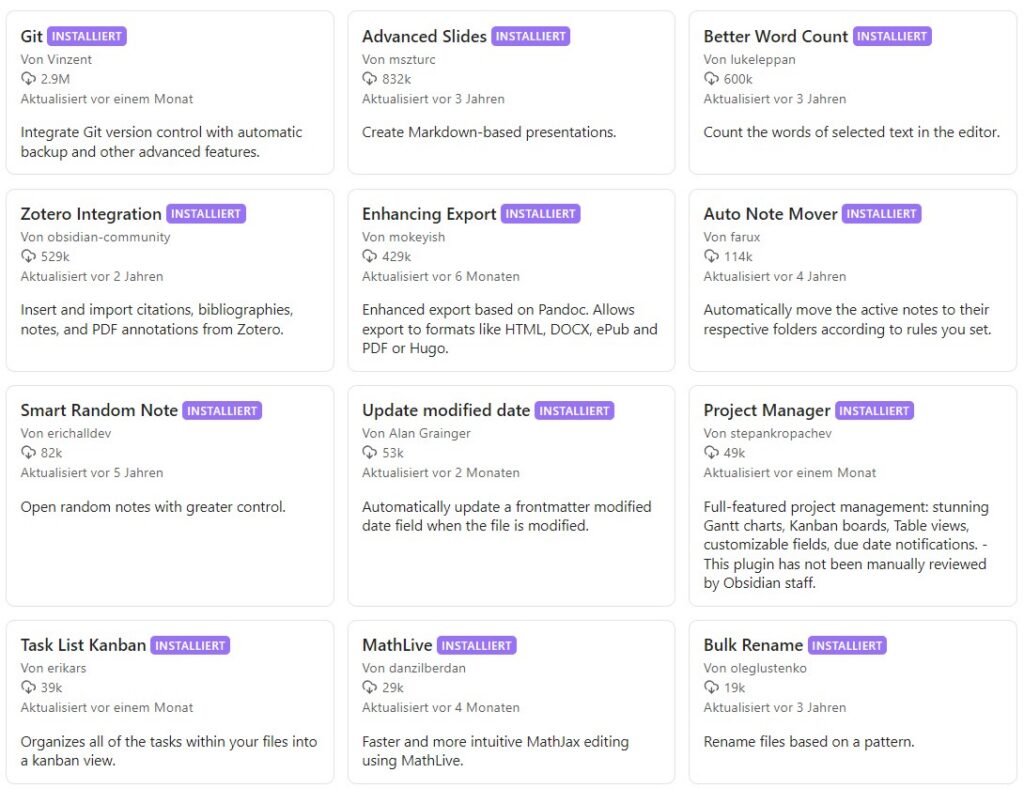
Here’s a quick rundown of the extensions (plugins) that have become absolutely essential for me.
1. Backups and Version Control
One of the most important plugins of all: “Git” by Vinzent: https://github.com/vinzent03/obsidian-git integrates a fully automated Git workflow into the Obsidian vault.
Advantage: regular backups of all changes. I’ve lost files far too often, or had computers break down, or found myself unable to access my work computer…
Of course, you need a Git account somewhere, but these are (still) free and easy to set up (e.g. on GitHub, GitLab, or the European alternative, Codeberg). The setup was well documented, and once it was up and running, I never gave it a second thought.
In fact, I set up two Git projects: one for my entire Vault as a backup, and one just for the folder containing the script files for my online courses, which I wanted to share with external peer reviewers. We were able to handle comments and feedback via Git issues and one or two video calls. That went well, but of course it helps to have a basic understanding of version control systems.
Full disclosure: I can (and need to/should) still learn a great deal about Git and the relevant workflows myself, but my knowledge is entirely sufficient for the purposes mentioned. (I wouldn’t be able to restore an old version from the Git history off the top of my head, but it’s reassuring to know that it would be possible. Somehow. I can figure that out when the time comes.)
2. Project management
For me, StepanKropachev’s relatively new “Project Manager for Obsidian” is an absolute game-changer: https://github.com/stepankropachev/obsidian-pm.
At last, I can keep track of my tasks without having to switch tools all the time!
(Disclaimer: so far, I’ve mainly been using it in my private Vault to track the tasks involved in renovating our house. For the current tasks at WiNoDa project, we’ve found other solutions here in the team, and I guess, the plugin would be insufficient to coordinate a large distributed team. But for my own tasks, this plugin will make my work much easier and help me keep track of where I’m at.)
Project Manager allows you to manage tasks, subtasks, milestones, dependencies, time tracking, etc. directly within the Vault. You can view this in a table, as a Gantt chart or via a Kanban board. The board is fully customisable, the Gantt chart is intuitively adaptable, you can assign people and tags, and the completion status is colour-coded. Everything I need, without having to switch contexts, offline and locally. Here, the developer himself explains what he’s created: https://www.reddit.com/r/ObsidianMD/comments/1sg3jcw/i_built_a_native_project_manager_for_obsidian/
For me, the “Project Manager” complements the “Task List Kanban” plugin by ErikaRS (https://github.com/erikars/task-list-kanban), which automatically transfers tasks created in documents (formatted as a checklist and tagged with a corresponding hashtag) to a Kanban board. This is extremely handy for bringing together all to-dos from various meeting minutes, meeting notes or conceptual documents in one central location. As it works on a folder-based system, however, it will simply be housed in the ‘Minutes’ folder from now on.
Export & Layout
One challenge (for me) remains exporting to a format that ‘other’ people can work with. Even though Markdown is becoming increasingly widespread, Word – or rather, the .docx format – remains the most widely used word processor and text format. And Obsidian’s default export format is PDF – which isn’t always ideal. With the “Enhancing Export” plugin by mokeyish (https://github.com/mokeyish/obsidian-enhancing-export), any Obsidian file can be exported to Word, various Markdown formats, HTML, LaTeX, etc.
However, you first need to install Pandoc on your local computer. I found the setup a bit complicated, but actually everything was well explained.
I often export documents as .docx files so I can format them in Word. Not all formatting is always recognised correctly, so you should check carefully to make sure headings, lists and so on have been carried over correctly. But then it’s easier for me to format the document, add colours, logos, page numbers and so on, and, above all, share it with others for further editing.
I’m still fairly sure that this can be done directly in Obsidian using CSS-based style sheets, but I haven’t had time to look into it yet. I’ll get round to it at some point.
Miscellaneous
Small plugins that make things a bit easier for me:
- “Better word count” by lukeleppan (https://github.com/lukeleppan/better-word-count).
- “Auto Note Mover” by farux (https://github.com/farux/obsidian-auto-note-mover)
- “Update modified date” by alangrainger (https://github.com/alangrainger/obsidian-frontmatter-modified-date)
Plugins that I haven’t used much so far, but which I think will be very useful for future projects:
- Advanced slides” byMSzturc (https://github.com/mszturc/obsidian-advanced-slides)
- “Zotero Integration” (https://github.com/obsidian-community/obsidian-zotero-integration)
I’ve only used both MathLive and BulkRename once – to format a formula more effectively and to standardise the filenames in an entire folder, respectively. It was helpful, but I don’t need to use them very often.
Well then. Do you use Obsidian as well? How have you configured your setup?
https://obsidian.md/
https://community.obsidian.md/search?type=plugin

- "Git" von Vinzent: https://github.com/vinzent03/obsidian-git
- "Project Manager for Obsidian" von StepanKropachev: https://github.com/stepankropachev/obsidian-pm
- "Task List Kanban" von ErikaRS: https://github.com/erikars/task-list-kanban
- "Enhancing Export" von mokeyish: https://github.com/mokeyish/obsidian-enhancing-export
- "Better word count" von lukeleppan: https://github.com/lukeleppan/better-word-count
- "Auto Note Mover" von farux: https://github.com/farux/obsidian-auto-note-mover
- "Update modified date" von alangrainger: https://github.com/alangrainger/obsidian-frontmatter-modified-date
- "Advanced slides" von MSzturc: https://github.com/mszturc/obsidian-advanced-slides
- "Zotero Integratio